> ## Documentation Index
> Fetch the complete documentation index at: https://docs.cantina.xyz/llms.txt
> Use this file to discover all available pages before exploring further.
# Comments & Pings
> Use comments and pings in Cantina Code to collaborate, notify users, and streamline Web3 security audits based on review type and repository settings.
# 🔶 Comments & Pings
On Cantina Code it is possible to **write comments** and **ping** other users so they receive a notification. **The functionality surrounding these features is dependent on the security review type and Cantina Repository settings** (e.g., a regular security review may have different functionality from a competition or bug bounty).
## Comments
Comment functionality is intuitive. If you need a refresher on the interface, visit the [Code Review](/cantina-code/cantina-code-for-security-researchers/code-review) section. While in Code Review mode, hovering over a line of code will display a blue box at the right side of the line number
.png?fit=max&auto=format&n=ku5dppycuRMaBQ9F&q=85&s=d83e0d540090046a25c8e2ed07e3e24d) which, when clicked, lets you submit a comment or start a [Findings submission](/cantina-code/cantina-code-for-security-researchers/findings/findings-submission).
which, when clicked, lets you submit a comment or start a [Findings submission](/cantina-code/cantina-code-for-security-researchers/findings/findings-submission).
.png?fit=max&auto=format&n=ku5dppycuRMaBQ9F&q=85&s=2783c8c0a988d559b05312fe17672a53) Depending on the context of the review, comments can be seen by everyone inside the Cantina Code Repository, your teammates or only you. Consult with the repository administrator if you have any doubts about comment visibility.
A feature to quickly jump through comments is being worked on. In the meantime:
1. Ping users on the comment so they receive a notification and can quickly navigate to it.
2. Copy the comment permalink and share it with other users.
Comments also support LaTeX formulas and Mermaid.js diagrams! Learn more in the [Diagrams and formulas](/cantina-code/cantina-code-for-security-researchers/diagrams-and-formulas) section.
## Pings
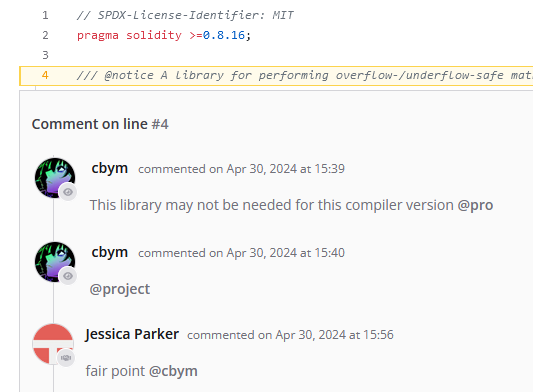
Pings enable a user to notify another user. As a Security Researcher, to notify all clients use the **`@project`** tag. The notified user will receive a notification via **email** and on the [Security Researcher Dashboard](/cantina-account/security-researcher-account/security-researcher-dashboard) page.
Depending on the context of the review, comments can be seen by everyone inside the Cantina Code Repository, your teammates or only you. Consult with the repository administrator if you have any doubts about comment visibility.
A feature to quickly jump through comments is being worked on. In the meantime:
1. Ping users on the comment so they receive a notification and can quickly navigate to it.
2. Copy the comment permalink and share it with other users.
Comments also support LaTeX formulas and Mermaid.js diagrams! Learn more in the [Diagrams and formulas](/cantina-code/cantina-code-for-security-researchers/diagrams-and-formulas) section.
## Pings
Pings enable a user to notify another user. As a Security Researcher, to notify all clients use the **`@project`** tag. The notified user will receive a notification via **email** and on the [Security Researcher Dashboard](/cantina-account/security-researcher-account/security-researcher-dashboard) page.
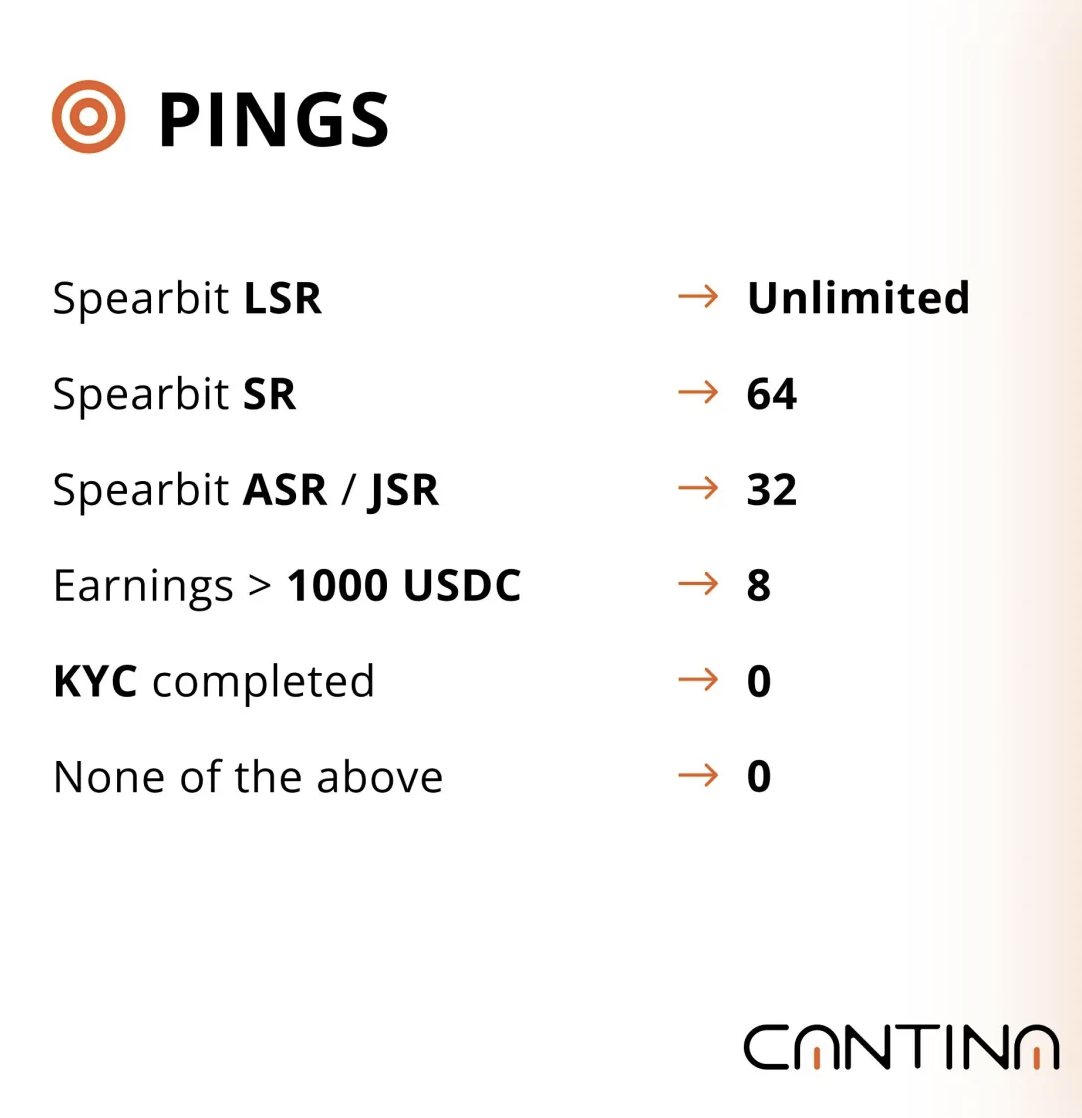
 Pings are also dependent on the security review type and repository settings. The number of pings for competitions is reflected by this infographic:
 Built with [Mintlify](https://mintlify.com).